About GDMS
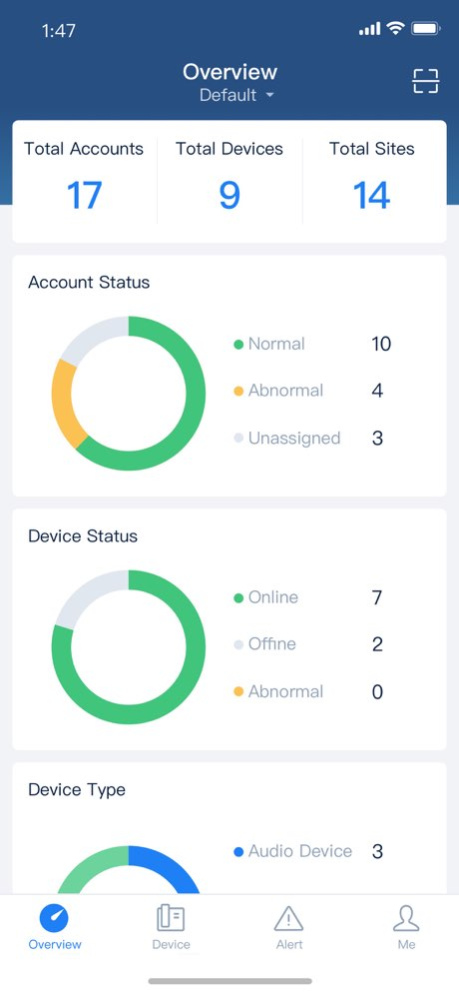
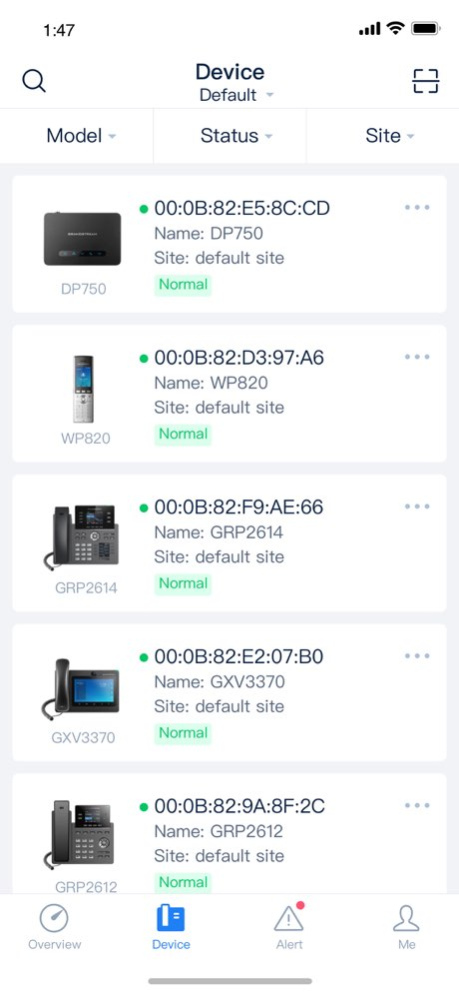
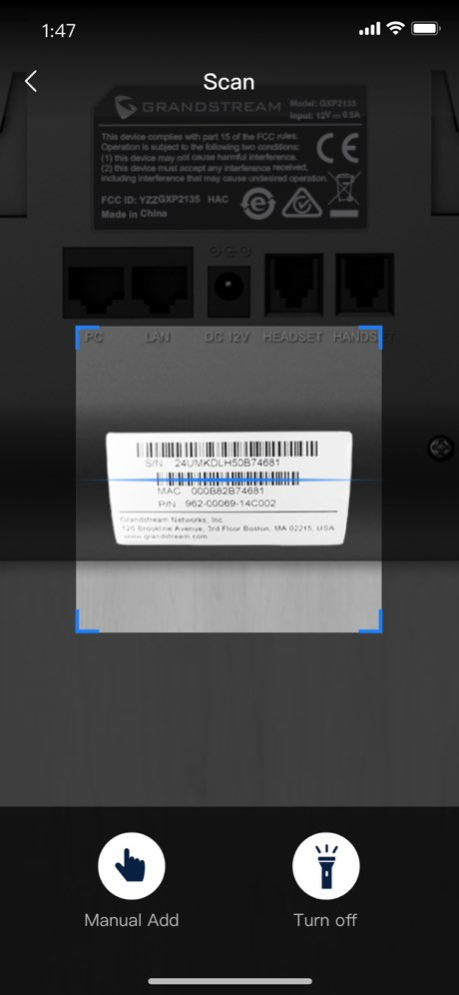
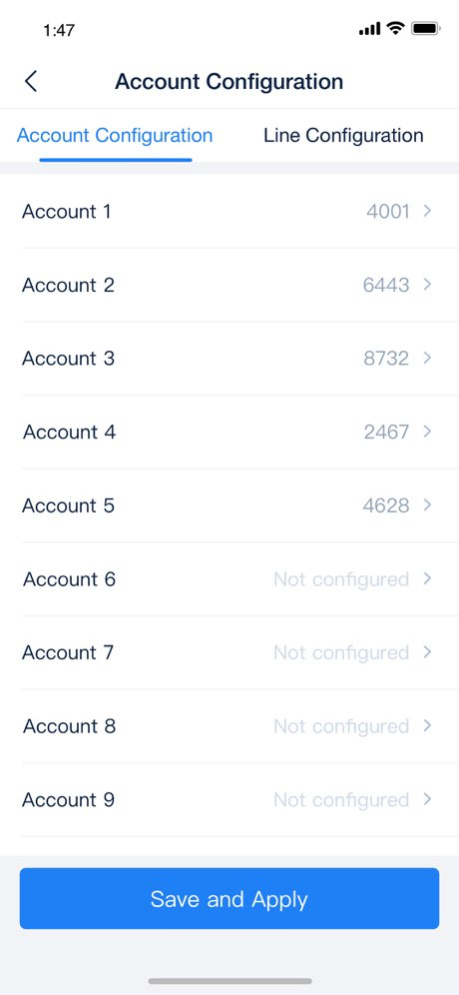
GDMS mobile application provides centralized, secure and zero-operation management methods and solutions for Grandstream audio/video products users. The device administrators can work on mobile devices by scanning the...
GDMS mobile application provides centralized, secure and zero-operation management methods and solutions for Grandstream audio/video products users. The device administrators can work on mobile devices by scanning the codes to add devices, configure accounts/upgrade devices firmware quickly, and the alert messages can be pushed to mobile client. Including: 1. Scan code to add device: Support to scan the barcodes of a batch of devices to add the devices to GDMS platform. 2. Manage device: Support to configure accounts for devices, upgrade devices firmware, and start the devices remotely. 3. Monitor device in real-time: Push the device registration, abnormal status, alert messages to mobile management client.
Version History 1. Added support for switching SecureAccess App. 2. Fixed some known issues. 1.11.13 Aug 5 1. Added SecureAccess package status display to the Overview page. 2. Supports multiple MFA methods for secure login. 3. Fixed some known issues. 1.11.7 Jun 18 1. Miscellaneous bug fixes. 1.11.4 Apr 8 1. Supported Multi-factor Authentication via emails. 1.11.3 11/05/2025 1. Support email multi-factor authentication when logging in. 2. Users who have not signed in for over one year will be automatically locked. They need to reset their password to unlock. 1.9.5 06/13/2025 1. Support email multi-factor authentication when logging in. 2. Users who have not signed in for over one year will be automatically locked. They need to reset their password to unlock. 1.9.4 06/04/2025 1. Added support for DP755, GXW42XX, GXW45XX, SoftwareUCM device management. 2. Added PBX Upgrades, Firewall Service, and SoftWareUCM package status statistics on the overview page. 3. Supported search function in the organization drop-down box. 4. Some interface optimizations and bug fixes. 1.7.2 01/15/2025 1. Added support for account registration (account creation). 2. Added support for registstration and login via Google/Apple accounts. 3. Added support for SAML single sign-on 4. Added ability to link Google/Apple accounts through the personal information section. 5. Added support for editing and deleting CloudUCMs. 1.5.4 11/20/2024 1. Added support for account registration (account creation). 2. Added support for registstration and login via Google/Apple accounts. 3. Added support for SAML single sign-on 4. Added ability to link Google/Apple accounts through the personal information section. 5. Added support for editing and deleting CloudUCMs. 1.5.3 11/16/2024 1. Modified the GDMS Logo and updated the login page. 2. Merged VoIP, UCMRC, CloudUCM systems to "GDMS Unified Communications". The bottom navigation menu was updated. 3. Supported GCC models and CloudUCM service management via the mobile app. 4. Added the ability to scan barcode or manually add PBX devices via the mobile app. 5. Supported quickly logging in to the GWN.Cloud app without password. 6. Optimized some functions and fixed some known bugs. 1.3.14 07/27/2024 1、Fixed Bugs 1.2.12 01/15/2024 1、Optimized barcode scanning function 2、Fixed Bugs 1.2.8 07/21/2023 1. Fixed bugs. 1.2.4 03/01/2022 1. Fix the issue that multi-factor authentication cannot log in 1.1.9 11/15/2021 1. Removed "Gateway System" section. 2. Moved HT models to the "VoIP System" section. 1.1.8 11/11/2021 1. Added to support Spanish, Latin Spanish, French, Greek, and Arabic languages in the GDMS platform. 2. Added to support UCMRC and Gateway sub systems in GDMS mobile application. 3. Added alert messages pushing function in GDMS mobile application. 1.1.7 11/06/2021 1. Added to support UCMRC sub system 2. Added to support multiple new languages, including Spanish, French, Greek, Arabic, and Japanese languages. 1.1.4 10/22/2021 1. Scan code to add device: Support to scan the barcodes of a batch of devices to add the devices to GDMS platform. 2. Manage device: Support to configure accounts for devices, upgrade devices firmware, and start the devices remotely. 3. Monitor device in real-time: Push the device registration, abnormal status, alert messages to mobile management client. 1.0.13 03/29/2020 1.0.5 03/03/2020
Previous Versions
Here you can find the changelog of GDMS since it was posted on our website on 2023-09-07 09:16:46.
The latest version is 1.11.13 and it was updated on 2026-10-06 16:08:57. See below the changes in each version.
GDMS version 1.11.13
Updated At: 2026-10-06
Changes: Version History 1. Added support for switching SecureAccess App.
2. Fixed some known issues. 1.11.13 Aug 5 1. Added SecureAccess package status display to the Overview page.
2. Supports multiple MFA methods for secure login.
3. Fixed some known issues. 1.11.7 Jun 18 1. Miscellaneous bug fixes. 1.11.4 Apr 8 1. Supported Multi-factor Authentication via emails. 1.11.3 11/05/2025 1. Support email multi-factor authentication when logging in.
2. Users who have not signed in for over one year will be automatically locked. They need to reset their password to unlock. 1.9.5 06/13/2025 1. Support email multi-factor authentication when logging in.
2. Users who have not signed in for over one year will be automatically locked. They need to reset their password to unlock. 1.9.4 06/04/2025 1. Added support for DP755, GXW42XX, GXW45XX, SoftwareUCM device management.
2. Added PBX Upgrades, Firewall Service, and SoftWareUCM package status statistics on the overview page.
3. Supported search function in the organization drop-down box.
4. Some interface optimizations and bug fixes. 1.7.2 01/15/2025 1. Added support for account registration (account creation).
2. Added support for registstration and login via Google/Apple accounts.
3. Added support for SAML single sign-on
4. Added ability to link Google/Apple accounts through the personal information section.
5. Added support for editing and deleting CloudUCMs. 1.5.4 11/20/2024 1. Added support for account registration (account creation).
2. Added support for registstration and login via Google/Apple accounts.
3. Added support for SAML single sign-on
4. Added ability to link Google/Apple accounts through the personal information section.
5. Added support for editing and deleting CloudUCMs. 1.5.3 11/16/2024 1. Modified the GDMS Logo and updated the login page.
2. Merged VoIP, UCMRC, CloudUCM systems to "GDMS Unified Communications". The bottom navigation menu was updated.
3. Supported GCC models and CloudUCM service management via the mobile app.
4. Added the ability to scan barcode or manually add PBX devices via the mobile app.
5. Supported quickly logging in to the GWN.Cloud app without password.
6. Optimized some functions and fixed some known bugs. 1.3.14 07/27/2024 1、Fixed Bugs 1.2.12 01/15/2024 1、Optimized barcode scanning function
2、Fixed Bugs 1.2.8 07/21/2023 1. Fixed bugs. 1.2.4 03/01/2022 1. Fix the issue that multi-factor authentication cannot log in 1.1.9 11/15/2021 1. Removed "Gateway System" section.
2. Moved HT models to the "VoIP System" section. 1.1.8 11/11/2021 1. Added to support Spanish, Latin Spanish, French, Greek, and Arabic languages in the GDMS platform.
2. Added to support UCMRC and Gateway sub systems in GDMS mobile application.
3. Added alert messages pushing function in GDMS mobile application. 1.1.7 11/06/2021 1. Added to support UCMRC sub system
2. Added to support multiple new languages, including Spanish, French, Greek, Arabic, and Japanese languages. 1.1.4 10/22/2021 1. Scan code to add device: Support to scan the barcodes of a batch of devices to add the devices to GDMS platform.
2. Manage device: Support to configure accounts for devices, upgrade devices firmware, and start the devices remotely.
3. Monitor device in real-time: Push the device registration, abnormal status, alert messages to mobile management client. 1.0.13 03/29/2020 1.0.5 03/03/2020
GDMS version 1.11.7
Updated At: 2026-07-27
Changes: Version History 1. Added SecureAccess package status display to the Overview page.
2. Supports multiple MFA methods for secure login.
3. Fixed some known issues. 1.11.7 Jun 18 1. Miscellaneous bug fixes. 1.11.4 Apr 8 1. Supported Multi-factor Authentication via emails. 1.11.3 11/05/2025 1. Support email multi-factor authentication when logging in.
2. Users who have not signed in for over one year will be automatically locked. They need to reset their password to unlock. 1.9.5 06/13/2025 1. Support email multi-factor authentication when logging in.
2. Users who have not signed in for over one year will be automatically locked. They need to reset their password to unlock. 1.9.4 06/04/2025 1. Added support for DP755, GXW42XX, GXW45XX, SoftwareUCM device management.
2. Added PBX Upgrades, Firewall Service, and SoftWareUCM package status statistics on the overview page.
3. Supported search function in the organization drop-down box.
4. Some interface optimizations and bug fixes. 1.7.2 01/15/2025 1. Added support for account registration (account creation).
2. Added support for registstration and login via Google/Apple accounts.
3. Added support for SAML single sign-on
4. Added ability to link Google/Apple accounts through the personal information section.
5. Added support for editing and deleting CloudUCMs. 1.5.4 11/20/2024 1. Added support for account registration (account creation).
2. Added support for registstration and login via Google/Apple accounts.
3. Added support for SAML single sign-on
4. Added ability to link Google/Apple accounts through the personal information section.
5. Added support for editing and deleting CloudUCMs. 1.5.3 11/16/2024 1. Modified the GDMS Logo and updated the login page.
2. Merged VoIP, UCMRC, CloudUCM systems to "GDMS Unified Communications". The bottom navigation menu was updated.
3. Supported GCC models and CloudUCM service management via the mobile app.
4. Added the ability to scan barcode or manually add PBX devices via the mobile app.
5. Supported quickly logging in to the GWN.Cloud app without password.
6. Optimized some functions and fixed some known bugs. 1.3.14 07/27/2024 1、Fixed Bugs 1.2.12 01/15/2024 1、Optimized barcode scanning function
2、Fixed Bugs 1.2.8 07/21/2023 1. Fixed bugs. 1.2.4 03/01/2022 1. Fix the issue that multi-factor authentication cannot log in 1.1.9 11/15/2021 1. Removed "Gateway System" section.
2. Moved HT models to the "VoIP System" section. 1.1.8 11/11/2021 1. Added to support Spanish, Latin Spanish, French, Greek, and Arabic languages in the GDMS platform.
2. Added to support UCMRC and Gateway sub systems in GDMS mobile application.
3. Added alert messages pushing function in GDMS mobile application. 1.1.7 11/06/2021 1. Added to support UCMRC sub system
2. Added to support multiple new languages, including Spanish, French, Greek, Arabic, and Japanese languages. 1.1.4 10/22/2021 1. Scan code to add device: Support to scan the barcodes of a batch of devices to add the devices to GDMS platform.
2. Manage device: Support to configure accounts for devices, upgrade devices firmware, and start the devices remotely.
3. Monitor device in real-time: Push the device registration, abnormal status, alert messages to mobile management client. 1.0.13 03/29/2020 1.0.5 03/03/2020
GDMS version 1.11.4
Updated At: 2026-06-07
Changes: Version History 1. Miscellaneous bug fixes. 1.11.4 Apr 8 1. Supported Multi-factor Authentication via emails. 1.11.3 11/05/2025 1. Support email multi-factor authentication when logging in.
2. Users who have not signed in for over one year will be automatically locked. They need to reset their password to unlock. 1.9.5 06/13/2025 1. Support email multi-factor authentication when logging in.
2. Users who have not signed in for over one year will be automatically locked. They need to reset their password to unlock. 1.9.4 06/04/2025 1. Added support for DP755, GXW42XX, GXW45XX, SoftwareUCM device management.
2. Added PBX Upgrades, Firewall Service, and SoftWareUCM package status statistics on the overview page.
3. Supported search function in the organization drop-down box.
4. Some interface optimizations and bug fixes. 1.7.2 01/15/2025 1. Added support for account registration (account creation).
2. Added support for registstration and login via Google/Apple accounts.
3. Added support for SAML single sign-on
4. Added ability to link Google/Apple accounts through the personal information section.
5. Added support for editing and deleting CloudUCMs. 1.5.4 11/20/2024 1. Added support for account registration (account creation).
2. Added support for registstration and login via Google/Apple accounts.
3. Added support for SAML single sign-on
4. Added ability to link Google/Apple accounts through the personal information section.
5. Added support for editing and deleting CloudUCMs. 1.5.3 11/16/2024 1. Modified the GDMS Logo and updated the login page.
2. Merged VoIP, UCMRC, CloudUCM systems to "GDMS Unified Communications". The bottom navigation menu was updated.
3. Supported GCC models and CloudUCM service management via the mobile app.
4. Added the ability to scan barcode or manually add PBX devices via the mobile app.
5. Supported quickly logging in to the GWN.Cloud app without password.
6. Optimized some functions and fixed some known bugs. 1.3.14 07/27/2024 1、Fixed Bugs 1.2.12 01/15/2024 1、Optimized barcode scanning function
2、Fixed Bugs 1.2.8 07/21/2023 1. Fixed bugs. 1.2.4 03/01/2022 1. Fix the issue that multi-factor authentication cannot log in 1.1.9 11/15/2021 1. Removed "Gateway System" section.
2. Moved HT models to the "VoIP System" section. 1.1.8 11/11/2021 1. Added to support Spanish, Latin Spanish, French, Greek, and Arabic languages in the GDMS platform.
2. Added to support UCMRC and Gateway sub systems in GDMS mobile application.
3. Added alert messages pushing function in GDMS mobile application. 1.1.7 11/06/2021 1. Added to support UCMRC sub system
2. Added to support multiple new languages, including Spanish, French, Greek, Arabic, and Japanese languages. 1.1.4 10/22/2021 1. Scan code to add device: Support to scan the barcodes of a batch of devices to add the devices to GDMS platform.
2. Manage device: Support to configure accounts for devices, upgrade devices firmware, and start the devices remotely.
3. Monitor device in real-time: Push the device registration, abnormal status, alert messages to mobile management client. 1.0.13 03/29/2020 1.0.5 03/03/2020
GDMS version 1.11.3
Updated At: 2025-11-05
Changes: 1. Supported Multi-factor Authentication via emails.
GDMS version 1.9.5
Updated At: 2025-06-13
Changes: Jun 13, 2025
Version 1.9.5
1. Support email multi-factor authentication when logging in.
2. Users who have not signed in for over one year will be automatically locked. They need to reset their password to unlock.
GDMS version 1.7.2
Updated At: 2025-01-15
Changes: Jan 15, 2025
Version 1.7.2
1. Added support for DP755, GXW42XX, GXW45XX, SoftwareUCM device management.
2. Added PBX Upgrades, Firewall Service, and SoftWareUCM package status statistics on the overview page.
3. Supported search function in the organization drop-down box.
4. Some interface optimizations and bug fixes.
GDMS version 1.5.4
Updated At: 2024-11-20
Changes: Nov 20, 2024
Version 1.5.4
1. Added support for account registration (account creation).
2. Added support for registstration and login via Google/Apple accounts.
3. Added support for SAML single sign-on
4. Added ability to link Google/Apple accounts through the personal information section.
5. Added support for editing and deleting CloudUCMs.
GDMS version 1.3.14
Updated At: 2024-07-27
Changes: Jul 27, 2024
Version 1.3.14
1. Modified the GDMS Logo and updated the login page.
2. Merged VoIP, UCMRC, CloudUCM systems to "GDMS Unified Communications". The bottom navigation menu was updated.
3. Supported GCC models and CloudUCM service management via the mobile app.
4. Added the ability to scan barcode or manually add PBX devices via the mobile app.
5. Supported quickly logging in to the GWN.Cloud app without password.
6. Optimized some functions and fixed some known bugs.
GDMS version 1.2.12
Updated At: 2024-01-15
Changes: Jan 15, 2024
Version 1.2.12
1、Fixed Bugs
GDMS version 1.2.8
Updated At: 2023-07-21
Changes: Jul 21, 2023
Version 1.2.8
1、Optimized barcode scanning function
2、Fixed Bugs
Disclaimer
Official App Store Link
We do not host GDMS on our servers. We did not scan it for viruses, adware, spyware or other type of malware. This app is hosted by Apple and passed their terms and conditions to be listed there. We recommend caution when installing it.
The App Store link for GDMS is provided to you by apps112.com without any warranties, representations or guarantees of any kind, so access it at your own risk.
If you have questions regarding this particular app contact the publisher directly. For questions about the functionalities of apps112.com contact us.